

Hey FG Fam! As you all know by now, we have a private Discord chat server, that makes communicating much easier for everyone and gives you direct access to our FantasyGuru Staff as well as thousands of other FantasyGuru Members! For anyone new to Discord, or having trouble getting setup, please follow our step by step guide below, on how to get into our Discord server!


Step 1: The first thing you will need to do in order to join our Discord server is to have a Discord account! If you are already familiar with Discord, and have an existing Discord account, you can proceed to Step 3. If not, you will need to head over to https://discord.com/register and sign up for a free Discord account!
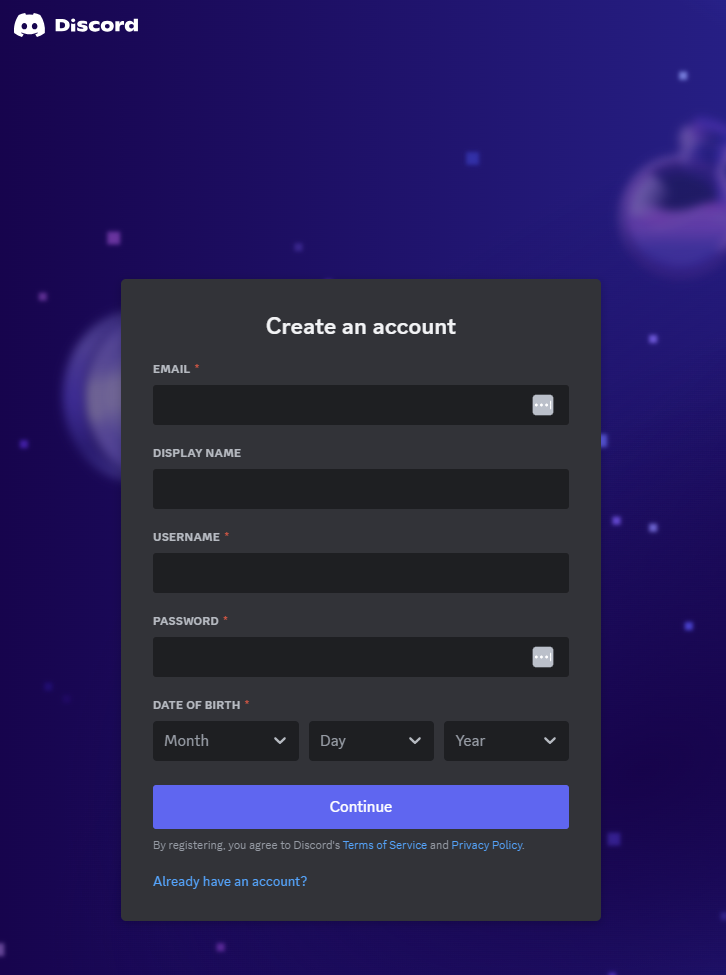
Step 2: Ok, once you have your Discord account setup, you will need to head over to your FantasyGuru dashboard Discord page here: https://shop.fantasyguru.com/my-account/discord-chat/
Step 3: On your Discord dashboard page, you will see the following set of instructions (see image below). In the box labeled DISCORD USERNAME *, enter your Discord Username (or copy and paste) and then hit the “Save Discord Username” button:
*Make sure to save your Discord USERNAME and NOT your Discord DISPLAY NAME in the field on this page!
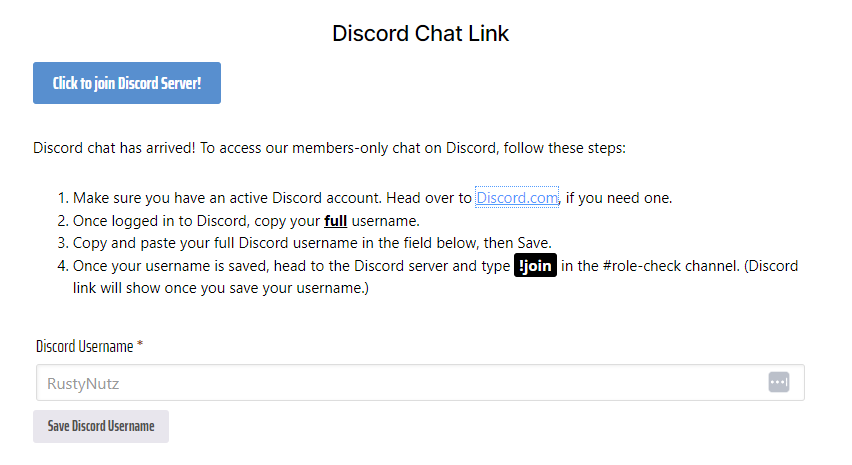
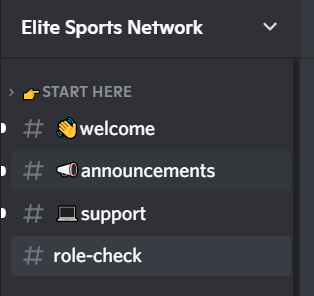
Step 4: Once you have entered and saved your Discord username, you will then see a blue button appear (Just like in the screenshot above in Step 3) that will say “Click to join Discord Server“. Once you see that button appear, all you then need to do is click on that button, which will open up Discord and take you to the #role-check channel on our Discord server.
Step 5: The final step is to get your roles assigned on the server so that you can see the different channels available to you based on your subscription type. You will do this by going to the #role-check channel (If you are not already there) and typing !join with a ! in front of the join. Please note, you MUST use an exclamation point, not an “i” or an “L” or any other character, as you will not have your roles assigned:
Step 6: Once you have completed the steps above, you should see our GuruBot respond with “Your roles have been setup. Enjoy!”, as shown in the screenshot below:
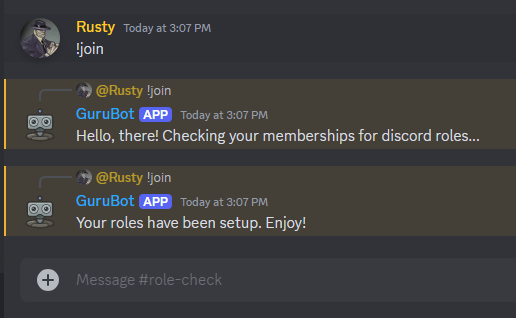
That’s it! Once you see the response from GuruBot saying your roles have been setup, you will then be able to see the private channels that you have access to on the left side of the site or app. Enjoy!
Troubleshooting
Although we try to make this process as simple as possible, we understand that sometimes there will be issues that prevent you from completing the steps above and getting your roles/access assigned to your account. Here are a few of the most frequent issues that we see and how to address them:
- Upon registering with Discord, if you receive a message saying that there is already an account with your email/info, or that you need to “Claim” your account, that usually means that you already have an account setup with your contact info, so you will need to setup a different account under a different email/phone, or simply use the “Forgot Password” link on the Discord page to retrieve your login information.
- Another common error we see is one where the GuruBot says that it cannot find your account or that you don’t have any roles to assign to your Discord account. If this happens, please go back to Step 2 and make sure that you have your Discord USERNAME saved and not your DISPLAY NAME. This is by far the most common mistake our members make when setting up their Discord account as the GuruBot cannot locate your account via your Display Name, it must be your Discord Username in order to work.
- The 2nd most common issue, that causes the same issue as above, is having an FantasyGuru membership that is no longer active or has expired. If you believe this may be the cause, please contact [email protected] and we would be happy to check your account and make sure that you have an active subscription, or even upgrade you if needed!
- Lastly, any other issues that you experience with the Discord app itself, please go the following page to fill out a Support Ticket with Discord: https://support.discord.com/hc/en-us/requests/new
Related articles
Tyler’s Thoughts – 2026 NFL Mock Draft
Tyler Buecher delivers his final 2026 NFL Mock Draft pairing general manager tendencies, team needs, schematic fits, and expected draft capital. You need a subscription to access this content. Choose from the following: VIP Memberships – Seasonal Annual Season-long content, draft guide, rankings, podcasts, and Discord access. $109.99 VIP Memberships – VIP Monthly Includes all plans: Seasonal, Daily, and Betting, plus exclusive tools and Discord. $99.99 NFL Memberships – NFL (All-In) $499.99 Already a member? Sign in.

BURR: Bullpen Usage & Reliever Ratings
Bullpen Usage & Reliever Ratings, or BURR, is an idea that Flowers and Mans have been playing around with since the 2017 season. The reason for their focus is simply that bullpens are a more important part of the modern game than ever before. You know what we mean. Whereas at one time starting pitchers…
SMASH: THE ULTIMATE FANTASY TOOL
We have developed the tool you need to have at your disposal in fantasy baseball. We’re talking the WAR of fantasy baseball here folks. This brief writeup will relay to you what SMASH is, why you need it and how to use it. *** You can use this link to sign up (scroll down and select…

One and Done Baseball Leagues
A couple of weeks ago we debuted Half-Season Fantasy Baseball Leagues. Today, we will introduce our second innovation as we continue to revolutionize the game of fantasy baseball – with the easiest format you can play – One and Done MLB Leagues! Read on to find out how you can turn $20 into $2,500. IT IS…
2026 Tout Wars Solds League
Ray Flowers breaks down his 15-team Tout Wars mixed league, a setup that uses three different categories versus a traditional 5x5 roto setup (more on this below). How did Ray’s team come together? After all, his last three years in this league he’s finished second, first and third. RULES 5 x 5 Rotisserie style scoring. Hitting Categories –…
2026: LABR Mixed League Review
LABR, the League of Alternative Baseball Reality, was formed in 1994 and continues to be run by Steve Gardner until this day. I used to eagerly anticipate the release of the USA Today each year when it came time to draft season, so I’m always honored to be part of the group asked to participate…